Openstack Keystone AD integration

목적

Openstack keystone 서비스를 AD와 연동하여 openstack 사용자 인증을 AD 디렉토리 인증을 사용하도록 함.

MultiDomian 구성 개요

  • Openstack keystone을 muiti-doamin 모드로 변경
  • Openstack 빌트인 사용자인증 도메인을 default로 인증.
  • 일반 사용자들의 인증은 AD_NAME 도메인으로 지정하여 AD 인증.
  • Default도메인의 admin에 AD_NAME 의 admin role을 할당하여 권한 관리
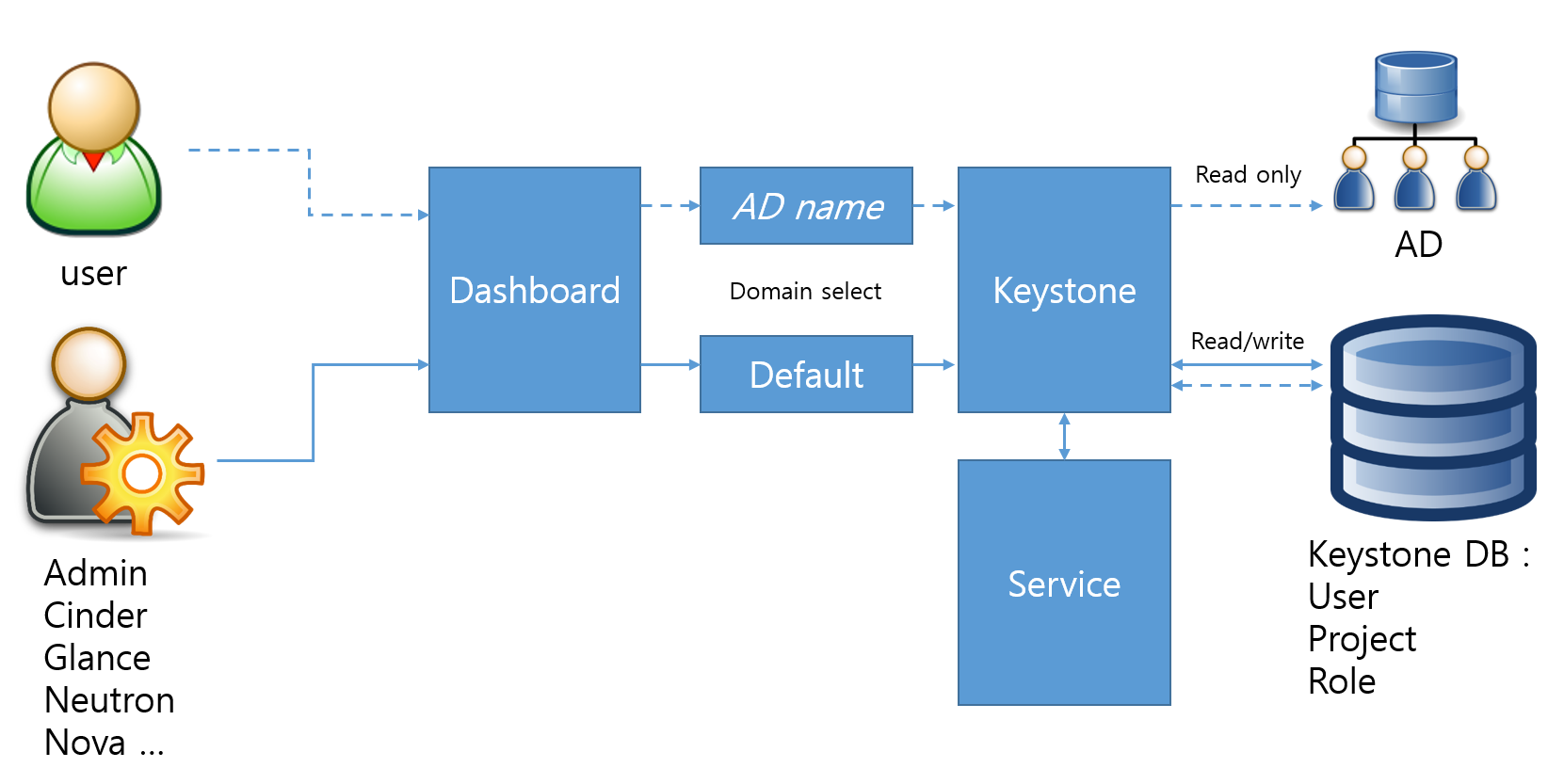
 

multidomain

사전 요구 사항

  • 특정 도메인 네임(AD_NAME.co.kr)으로 구성된 Active Directory 서비스
  • keystone 모듈이 AD 서버 LDAP 바인딩을 위한 계정(ldap@AD_NAME.co.kr)
  • 일반 사용자로 할당할 계정이 포함된 OU 나 Group

구성 방법

1) keystonerc_admin_v3 파일 생성 및 수정

 
# cp keystonerc_admin keystonerc_admin_v3

keystonerc_admin_v3 파일 수정 (v2.0 을 V3로 수정)

 
export OS_AUTH_URL=http://controllerIP:5000/v3/

keystonerc_admin_v3 파일 마지막에 아래 내용 추가

 
export OS_IDENTITY_API_VERSION=3
export OS_PROJECT_DOMAIN_NAME=Default   
export OS_USER_DOMAIN_NAME=Default

2) controller 설정

SElinux 사용중인 경우 아래와 같이 LDAP 조회 허용 설정

 
# setsebool -P authlogin_nsswitch_use_ldap=on

아래와 같이 출력되면 정상

Full path required for exclude: net:[4026532245].

keystone 이 사용할 도메인용 conf 파일 추가를 위한 디렉토리 생성

# mkdir /etc/keystone/domains/
# chown keystone /etc/keystone/domains/


도메인 기반의 keytone 사용을 위한 keystone 설정 변경

# openstack-config --set /etc/keystone/keystone.conf identity domain_specific_drivers_enabled true
# openstack-config --set /etc/keystone/keystone.conf identity domain_config_dir /etc/keystone/domains
# openstack-config --set /etc/keystone/keystone.conf assignment driver keystone.assignment.backends.sql.Assignment


도메인 기반 인증 UI로 dashboard 설정 변경을 위한 /etc/openstack-dashboard/local_settings 파일 수정


OPENSTACK_API_VERSIONS = {   "identity": 3 }
OPENSTACK_KEYSTONE_MULTIDOMAIN_SUPPORT = True
OPENSTACK_KEYSTONE_DEFAULT_DOMAIN = 'Default'

keystone 및 httpd 재시작


# systemctl restart openstack-keystone.service
# systemctl restart httpd

openstack 에서 AD_NAME 도메인 추가 (실제 사용할 AD 도메인의 NetBIOSName으로 등록)


# openstack domain create AD_NAME

Neople 도메인 인증시 사용할 conf 파일 생성 및 내용 추가

/etc/keystone/domains/keystone.AD_NAME.conf 생성 및 아래 내용 추가


[ldap]
query_scope = sub
url = ldap://1.3.1.1, ldap://1.3.1.2
user = CN=ldap,OU=Domain Users,DC=AD_NAME,DC=co,DC=kr
password  = ****
suffix                   = dc=AD_NAME,dc=co,dc=kr
user_tree_dn             = OU=AD_NAME,OU=Domain Users,DC=neople,DC=co,DC=kr
user_objectclass         = person
user_id_attribute        = cn
user_name_attribute      = cn
user_mail_attribute      = mail
user_pass_attribute      =
user_enabled_attribute   = userAccountControl
user_enabled_mask        = 2
user_enabled_default     = 512
user_attribute_ignore    = password,tenant_id,tenants
user_allow_create        = False
user_allow_update        = False
user_allow_delete        = False
 
[identity]
driver = keystone.identity.backends.ldap.Identity


위에서 생성한 파일을 keystone 소유로 할당

# chown keystone /etc/keystone/domains/keystone.AD_NAME.conf


admin user 에게 AD_NAME 도메인 권한 부여

1.AD_NAME 도메인의 ID 확인

# openstack domain show AD_NAME
+-------------+----------------------------------+
| Field       | Value                            |
+-------------+----------------------------------+
| description |                                  |
| enabled     | True                             |
| id          | ebc6dd274b074f8abf32966bfec9157a |
| name        | AD_NAME                           |
+-------------+----------------------------------+

2. admin user의 ID 확인

# openstack user list --domain default | grep admin
| 7dcb5309a6bf4e50870b2615e14fb204 | admin   |

3. role ID 확인

# openstack role list
+----------------------------------+----------+
| ID                               | Name     |
+----------------------------------+----------+
| 180c8d81358a4e0f84b97dd10f114151 | admin    |
| 9fe2ff9ee4384b1894a90878d3e92bab | _member_ |
+----------------------------------+----------+

4. 위에서 확인된 ID 넘버를 가지고 AD_NAME 도메인의 admin role에 admin user를 할당

# openstack role add --domain ebc6dd274b074f8abf32966bfec9157a --user 7dcb5309a6bf4e50870b2615e14fb204 180c8d81358a4e0f84b97dd10f114151

keystone 서비스 재시작

# systemctl restart openstack-keystone.service


userlist 확인

 
# openstack user list --domain AD_NAME
 
# openstack user list --domain default


컴퓨트 노드 설정

각각의 컴퓨트 노드에서 아래 명령으로 keytstone v3 를 사용하도록 변경

# openstack-config --set /etc/nova/nova.conf keystone_authtoken auth_version v3


컨트롤러 노드의 nova 서비스 재시작

# systemctl restart openstack-nova-api.service openstack-nova-cert.service openstack-nova-conductor.service openstack-nova-consoleauth.service openstack-nova-novncproxy.service openstack-nova-scheduler.service

각각의 컴퓨트 노드에서 nova 서비스 재시작

# systemctl restart openstack-nova-compute.service


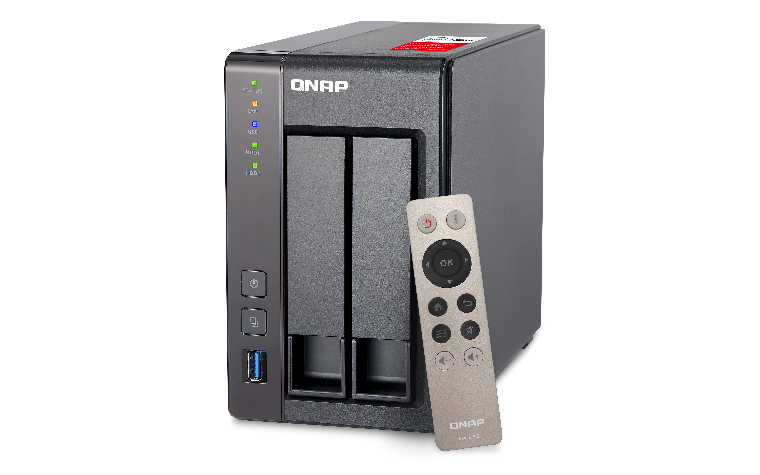
QNAP TS-251+

195_1447728785_TS-2512B

ASUS N66W에 USB 하드에 만족하다가
QNAP이라는 성능좋고 엔지니어 성향의 NAS가 좋은 가격에 공구하고 있길래 구입.

2016년 내 생일선물로 사는건데,
공구가 인기가 좋다보니 재고 부족으로 내 생일날인 12일 발송한다네.. 이것도 인연인가 ㅡㅡ;

기본적인 요즘 NAS의 편리한 기능들 외에, 하드웨어 트랜스 코딩
HDMI로 모니터 연결 및 블루투스 키보드 마우스 연결로 간단한 PC 처럼 사용할 수도 있고,
가상 호스트 서버로의 역할도 해서 게스트 OS에 docker container까지 올릴 수 있단다.

Synology 4bay NAS인 415+ 와 둘중에 지금도 고민중이지만,
가지고 놀기엔 QNAP이 재밌을것 같다.

CPU Quad-Core Intel® Celeron® 2.0GHz (burst up to 2.42GHz)
Floating Point Unit
V
GPU Intel® HD Graphics
Hardware-Acclerated Transcoding V
Memory System memory:

TS-251+-2G: 2GB DDR3L RAM (1 x 2GB)
TS-251+-8G: 8GB DDR3L RAM (2 x 4GB)

Total memory slots: 2 SODIMM
Expandable up to: 8 GB

NOTE:
1. When installing two memory modules, please ensure that they are the same size and ideally use the same type of RAM for both memory slots.
2. For the information of RAM module installation and compatible NAS models, please refer to the QNAP RAM Module Installation Guide

Flash Memory 512MB
Drive 2 x 2.5″ or 3.5″ SATA 6Gb/s, 3Gb/s HDD or SSD; hot swappable trays

NOTE:
For the HDD compatibility list, please visit https://www.qnap.com/compatibility

Expansion Unit Max. 1 (UX-800P, UX-500P)
Gigabit LAN Ports 2
USB 2 x USB 3.0 (Front: 1, Rear: 1)
2 x USB 2.0 (Rear)
IR Receiver Yes (QNAP RM-IR002 remote control)
HDMI 1
LED Indicators Power/Status, LAN, USB, HDD1-2
Buttons Power, Reset, USB Auto Copy
Alarm Buzzer System warning
Form Factor Tower
Dimensions (HxWxD) 168.5 x 102 x 225 mm
6.63 x 4.02 x 8.86 inch
Weight (Net / Gross) 1.28 kg (2.82 lbs) / 2.32 kg (5.11 lbs)
System Fan 1 x 7cm, 12V DC
Kensington Security Slot 1
Power Supply External Power Adapter, 60W, 100-240V
Power Consumption (W) S3 sleep: 0.57
HDD standby: 10.56
In operation (typical): 18.09
Temperature 0 – 40 °C
Humidity 5~95% RH non-condensing, wet bulb: 27˚C

USB to Serial for MAC

현재 대부분의 Usb to Serial 케이블은 FTDI의 FT232x 또는 Prolific의 PL-2303를 사용하고 있다.

내가 갖고 있는 케이블의 제조사를
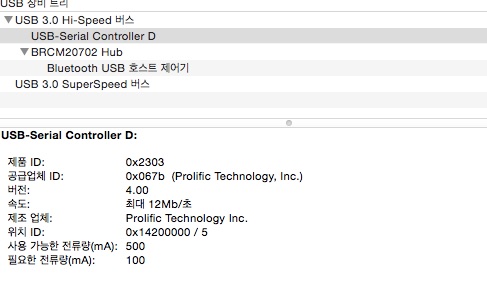
system information 에서 찾아보고

usbtoserial


제조 업체가 prolific으로 나오면 아래의 패키지를

 PL2303_MacOSX_v1.5.1.pkg

FTDI로 나오면 아래의 패키지를 설치해준다.

 FTDIUSBSerialDriver_v2_2_18.dmg

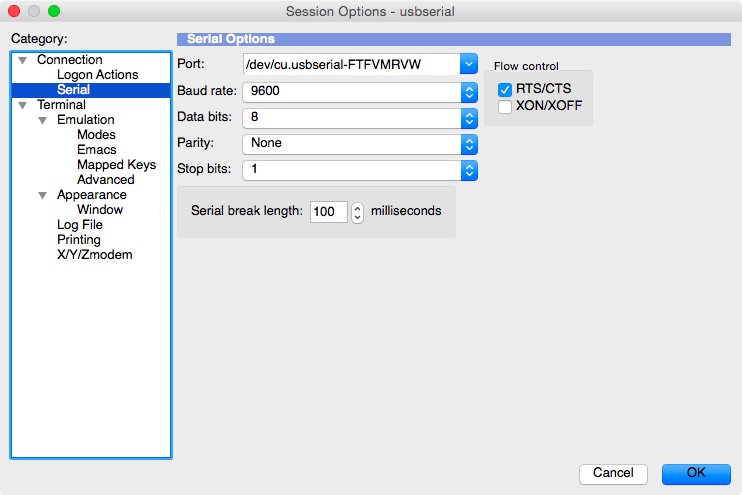
설치후에는 사용하는 터미널 프로그램에서 device 를 찾아 연결 설정 해주면 됨.

crt

구글 캘린더 음력 기념일 등록

다음 캘린더가 2015년 9월 1일 부로 종료된다네,
음력 기념일 (제사, 생일 등)을 다음 캘린더에 등록하고 이를 아이폰과 caldav로 연동해서 사용중이었는데, 대안을 찾다가 발견한 사이트

http://googlelunar.cpueblo.com/index.html

고마운 개발자 분이 만든 사이트 인데,
음력 기념일을 하나씩 입력하고 ‘구글에 등록하기’ 버튼을 누르면 등록이 시작된다.

운전석 전륜 쇽,타이로드 및 스트럿 마운트 주문

운전석 스트럿 부근에서 딸깍 딸깍하는 소리가 간헐적으로 들려서,
델타모터스 점검결과 타이로드에서 나는것 같다하여,
누유가 확인된 운전석 전륜 스트럿과 같이 교환할 품목들 구입

Strut은 http://www.autohausaz.com/에서 구매할 예정이고,
타이로드와 스트럿 마운트만 보다 저렴한 펠리컨파츠에서 부품 구입

Part Number Status Description Price Quantity Subtotal

32-10-6-777-503-M69
Shipped Tie Rod, Left – 
Brand: Lemfoerder

[More Info]
 
NEW FEATURE: Write a Review for this item!

$73.75

1
$73.75

32-10-6-777-504-M69
Shipped Tie Rod Assembly (Right) 
Brand: Lemfoerder

[More Info]
 
NEW FEATURE: Write a Review for this item!

$74.75

1
$74.75

31-33-6-760-943-M69
Shipped GUIDE SUPPORT
[More Info]
 
NEW FEATURE: Write a Review for this item!

$26.00

1
$26.00

델타에서는 타이로드와 쇽만 교체할것을 의견 받았으나,
관련 정보를 찾다가 시속님 블로그( http://blog.naver.com/mintyblue/130189284723) 글을 보고 마운트에서 발생하는 소음일 수도 있을것 같아서
같이 주문했다.
근데 마운트를 운전석만 교환해도 될지는 모르겠다. 조수석 마운트까지 같이 사면 관세범위인 $200을 넘어가버리니
쇽을 주문할때 조수석것도 같이 배송대행 해야할듯하다.

추가사항 하나

pelicanparts에서 strut mount를 검색하면 lemfoerder 제품기준으로 2가지 모델이 조회되는데
하나는 2003년 10월까지 사용된 부품이고 하나는 2003년 11월 이후모델에 사용된 부품이라고 표시되어있다.
내 330ci의 차대번호를 조회하면 2003년 11월 제조라고 표시되므로 31-33-6-760-943를 사용해야 맞을것 같다.
처음에 31-33-6-752-735로 주문했다가 급변경 요청으로 처리했다.
두 부품간의 차이는 더 조사가 필요하다.

autohaus AZㅇㅔ서 ㄱㅜ매하ㄴ

31312282459
Strut Assembly; Front Left
$162.83
1
$162.83
Parts Total: $162.83
Refundable Core Total: $0.00
Shipping & Handling: $0.00
Total Before Tax: $162.83
Sales Tax*: $0.00


펠리컨 파


13-72-1-744-869-M63
Shipped Air Filter 
Brand: Mann, 2003 BMW 330Ci Coupe

[More Info]
 
NEW FEATURE: Write a Review for this item!

$13.75

1
$13.75

31-33-6-760-943-M69
Shipped Strut Mount (Front Left or Right, from 11/03) 
Brand: Lemfoerder 

[More Info]
 
NEW FEATURE: Write a Review for this item!

$26.00

1
$26.00

64-31-9-216-591-M63
Shipped Cabin Air Filter – Paper 
Brand: Mann, 2003 BMW 330Ci Coupe

[More Info]
 
NEW FEATURE: Write a Review for this item!

$18.50

1
$18.50

07-14-7-129-160-M9
Packed & Shipped Hex Head Screw with Washer, 330Ci (2001-06) Convertible/Coupe with M54 Engine (E46), 
Brand: Genuine BMW

[More Info]
 
NEW FEATURE: Write a Review for this item!

$1.25

3
$3.75

33-55-6-751-269-M604
Packed & Shipped Sway Bar Bushing – 23.5 mm (Front) 
Brand: Vaico 

[More Info]
 
NEW FEATURE: Write a Review for this item!

$9.00

2
$18.00

TOL-LIS14500
Packed & Shipped Oil Filter Socket, 3/8″ Drive, for 35/36mm Filters, 2003 BMW 330Ci Coupe
[More Info]
 
NEW FEATURE: Write a Review for this item!

$11.95

1
$11.95

51-71-8-224-986-M9
Shipped Fender Inner Wheel Lower Cover, Right, 323Ci/iC, 325Ci/iC, 328Ci, 330Ci/iC, Each 
[More Info]
 
NEW FEATURE: Write a Review for this item!

$61.75

1
$61.75

Amazon EC2 free tier 요금

Amazon EC2 free tier 사용시 요금이 부과되는 경우

EC2
EC2 인스턴스를 t1-micro 타입 이상의 사양으로 만들어서 사용하는 경우
EC2 인스턴스의 전체 사용시간이 750시간이 넘어 간 경우
ex) EC2 인스턴스 한개를 한달내내 켜놔서 750시간을 사용해 놓고, 그 인스턴스외에 다른 인스턴스를 추가로 더 사용해서 전체 사용시간이 750시간이 넘을때

EIP
EIP를 만들고 EC2에 붙여서 사용하지 않은 경우
EIP를 만들고 EC2에 붙였지만, 해당 EC2를 정지해 놓은 경우

EBS
EBS 사용량이 30GB를 넘어가는 경우
EC2인스턴스를 생성할때 AMI를 CentOS로 선택한 경우 EBS가 기본 8기가가 할당됩니다. 근대 생성할때 Delete on Termination을 체크하지 않고 생성하면, EC2인스턴스를 삭제할때 자동으로 EC2에 할당된 EBS가 삭제되지 않습니다. 그래서 여러번 인스턴스를 생성했다 삭제할 경우 EBS가 계속 쌓여서 30GB가 넘는 경우가 발생합니다.
이걸 피하는 방법은 EC2인스턴스를 생성할때 Delete on Termination을 키고서 생성하시거나, EC2인스턴스를 삭제할때 EC2->ELSTIC BLOCK STORAGE->Volumes에서 EBS도 같이 삭제 하셔야 합니다.

데이터 전송

월 15GB의 데이터 전송을 초과하는 경우 과금됨

dell venue 8 pro

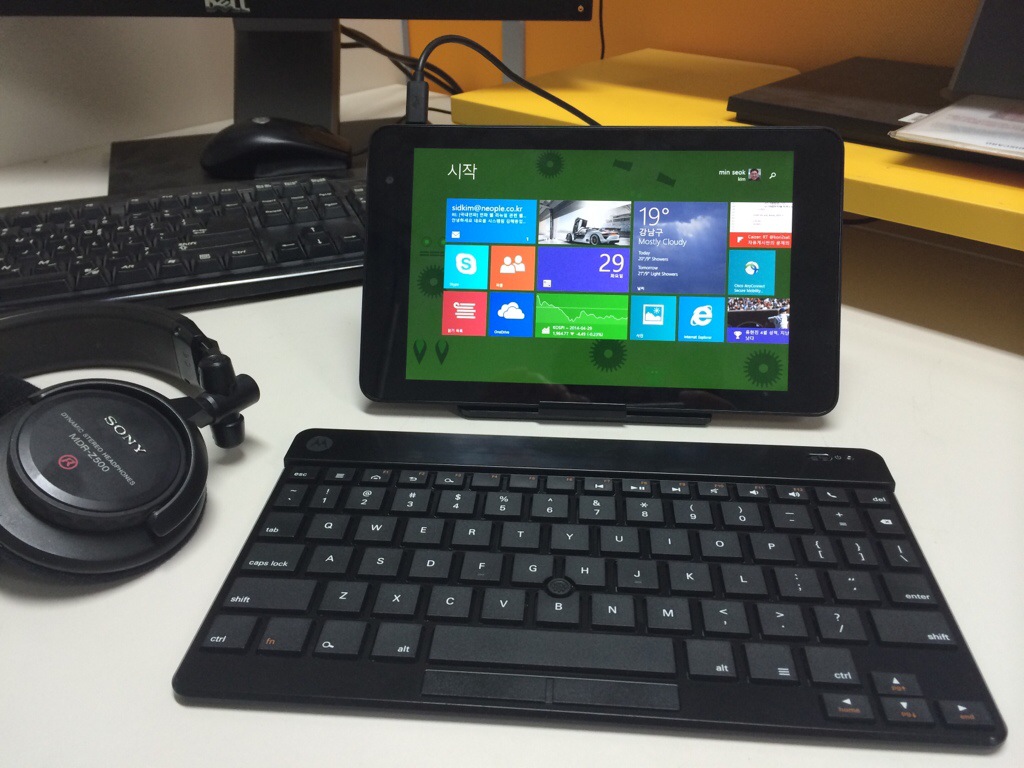
델 공홈에서 리퍼로 구입한 베뉴 8 pro
잘 어울리고 쓸만한 키보드를 고르고 고르다 동생이 쓰던 모토롤라 kz450 으로 선택하고 매칭하니 완벽해졌다.

검콩까지 있으니 마우스 고민도 덜었다.

20140429-162350.jpg

사용기는 널리고 널려서
나만의 사용기라고 할수있는게 나온다면 쓸 예정.

ASUS WRT-N66W firmware upgrade

지난번 N66W 구매 및 세팅기의 마지막 부분에

IPTV의 호환성을 위해서는 특정 Firmware 버전만을 사용하여야 제대로 동작하다는 조건이 있었는데,

그 버전 이후에 많은 업데이트가 있어왔음에도 불구하고 제대로?B?TV와 호환되는 버전은 없었습니다.

심지어??제대로 동작하는 구 버전에서도 최근 화면 끊김 현상이 발생하고 있었지요..


그러다 최근 ASUS 홈페이지에 최신 Firmware 가 올라온걸 보고 다시 적용해 보았습니다.

버전은 3.0.0.4.374_4561 이구요.

Description ASUS RT-N66U Firmware version 3.0.0.4.374.4561Security related issues:

1. Force changing FTP from anonymous to account mode after firmware upgraded.

2. Patched IPv6 user interface from Merlin’s build.

UI

1. Fixed IE and Firefox compatibility issues.

2. Network map will show notification when newer firmware available.

3. Fixed USB tray icon UI bug.

File Size 25,56 MBytesupdate?2014.02.21


2개의 보안 이슈와 3개의 UI 이슈만 해결된 버전인데..

결론을 말씀 드리자면? 잘 됩니다. !!!

IPTV 잘 나오구요, 끊김현상도 사라졌습니다.

Download master도 업그레이드가 되어서 torrent 추가할때 다운받는 파일의 정보를 표시해주네요.


특별한 문제가 없는 한 이 버전을 계속 유지할 생각입니다.

이 머신에서 더 이상 기대할건 없을거란 생각입니다.

Graylog2 installation on Ubuntu server

Setting GrayLog2 Server

Graylog2-server-0.11, Graylog2-web-intrerface-0.11 기준 설치 예시

Up to date Ubuntu 12.04 server x64

apt-get update && apt-get upgrade

Installing mongodb

echo -e "deb http://downloads-distro.mongodb.org/repo/ubuntu-upstart dist 10gen\n" > /etc/apt/sources.list.d/mongodb-10gen.list
apt-get update
apt-get install mongodb-10gen

create the mongodb user:

mongo
use graylog2
db.addUser("grayloguser", "123")
exit

Installing Java

apt-get install openjdk-6-jdk 
ln -s /usr/lib/jvm/java-6-openjdk-amd64 java-6-openjdk
cat <<EOF > /etc/profile.d/java.sh
export JAVA_HOME=/usr/lib/jvm/java-1.6.0-openjdk-amd64
EOF

source /etc/profile.d/java.sh

Installing elasticsearch

wget https://download.elasticsearch.org/elasticsearch/elasticsearch/elasticsearch-0.20.4.deb 
dpkg -i elasticsearch- 0.20.4.deb
service elasticsearch start

Check Elasticsearch service

curl -XGET 'http://localhost:9200/_cluster/health?pretty=true'
output
{ “cluster_name” : “elasticsearch”, “status” : “green”, “timed_out” : false, “number_of_nodes” : 1, “number_of_data_nodes” : 1, “active_primary_shards” : 0, “active_shards” : 0, “relocating_shards” : 0, “initializing_shards” : 0, “unassigned_shards” : 0 }

Installing graylog2-server

mkdir -p /opt/graylog2 && cd /tmp
wget http://download.graylog2.org/graylog2-server/graylog2-server-0.11.0.tar.gz
tar -xzvf graylog2-server-0.11.0.tar.gz -C /opt/graylog2
cd /opt/graylog2
ln -sf graylog2-server-0.11.0 graylog2-server
cp graylog2-server/graylog2.conf.example /etc/graylog2.conf
You should change the value of the mongodb_password too If you changed the mongodb_user’s password in mongodb console.

Configuring service

cat <<EOF > /etc/init/graylog2-server.conf
description "graylog2 server"
author  "Mick Pollard <aussielunix@gmail.com>"
modified  "DaeHyung <daehyung@gmail.com>"
start on runlevel [2345]
stop on runlevel [06]
# tell upstart we're creating a daemon
# upstart manages PID creation for you.
expect fork
script
  cd /opt/graylog2/graylog2-server
  exec sudo java -jar graylog2-server.jar > /opt/graylog2/graylog2-server/log/graylog2.log 2>&1 &
  emit graylog2-server_running
end script
EOF
touch /opt/graylog2/graylog2-server/log/graylog2.log
cd /var/log && ln -s /opt/graylog2/graylog2-server/log/graylog2.log
service graylog2-server start

위의 service graylog2-server start 는 동작 안함.
아래 /etc/init.d/graylog2-server? 파일 생성 후 /etc/init.d/graylog2-server start? 로 실행

/etc/init.d/graylog2-server? 생성


#!/bin/bash

CMD=$1
NOHUP=`which nohup`

GRAYLOG2CTL_DIR="/opt/graylog2/graylog2-server/bin"
GRAYLOG2_SERVER_JAR=graylog2-server.jar
GRAYLOG2_CONF=/etc/graylog2.conf
GRAYLOG2_PID=/tmp/graylog2.pid
LOG_FILE=log/graylog2-server.log

start() {
    echo "Starting graylog2-server ..."
    cd "$GRAYLOG2CTL_DIR/.."
    sleep 2m
    $NOHUP java -jar ${GRAYLOG2_SERVER_JAR} -f ${GRAYLOG2_CONF} -p ${GRAYLOG2_PID} >> ${LOG_FILE} &
}

stop() {
    PID=`cat ${GRAYLOG2_PID}`
    echo "Stopping graylog2-server ($PID) ..."
    if kill $PID; then
        rm ${GRAYLOG2_PID}
    fi
}

restart() {
    echo "Restarting graylog2-server ..."
    stop
    start
}

status() {
    pid=$(get_pid)
    if [ ! -z $pid ]; then
        if pid_running $pid; then
            echo "graylog2-server running as pid $pid"
            return 0
        else
            echo "Stale pid file with $pid - removing..."
            rm ${GRAYLOG2_PID}
        fi
    fi

    echo "graylog2-server not running"
}

get_pid() {
    cat ${GRAYLOG2_PID} 2> /dev/null
}

pid_running() {
    kill -0 $1 2> /dev/null
}

case "$CMD" in
    start)
        start
        ;;
    stop)
        stop
        ;;
    restart)
        restart
        ;;
    status)
        status
        ;;
    *)
        echo "Usage $0 {start|stop|restart|status}"
        RETVAL=1
esac


Installing graylog2-web-interface

apt-get install curl

cd /tmp
wget http://download.graylog2.org/graylog2-web-interface/graylog2-web-interface-0.11.0.tar.gz
tar -xzvf graylog2-web-interface-0.11.0.tar.gz -C /opt/graylog2
cd /opt/graylog2
ln -sf graylog2-web-interface-0.11.0 graylog2-web-interface
chown www-data.www-data -R /opt/graylog2/graylog2-web-interface

Installing RUBY 2.0

Preparing

apt-get install build-essential libcurl4-openssl-dev libssl-dev zlib1g-dev

Installing Ruby 2.0

cd /tmp
wget http://ftp.ruby-lang.org/pub/ruby/2.0/ruby-2.0.0-p0.tar.gz
tar -xzvf ruby-2.0.0-p0.tar.gz -C /opt/graylog2
cp ruby-2.0.0-p0 
cd /opt/graylog2/ruby-2.0.0-p0 
./configure && make && make install
update-alternatives --install /usr/bin/ruby ruby /usr/local/bin/ruby 20000

Check ruby is working

ruby -v

Installing bundler and others

gem install bundler --no-rdoc --no-ri

Change the version of json in the Gemfile

/opt/graylog2/graylog2-web-interface/Gemfile
...skiped...
gem 'json', '~> 1.5.5'               ===> change 1.5.5 to 1.7.7
...skiped...
Run bundle command for update json
bundle update json
bundle install

Installing web server daemon

apt-get install apache2-mpm-prefork apache2-prefork-dev libapr1-dev libaprutil1-dev
or
apt-get install nginx

Get passenger and make sure you pull the pre version

The Passenger is A modern web server and application server for Ruby, Python and Node.js, optimized for performance, low memory usage and ease of use.
Passenger web site 😕http://rubygems.org/gems/passenger

Installing the passenger module (for apache)

gem install passenger --no-rdoc --no-ri --pre
(For Apache) passenger-install-apache2-module
(For Nginx) passenger-install-nginx-module

Creating configuration files (for apache)

cd /etc/apache2/mods-available
cat <<EOF > passenger.conf
PassengerRoot /usr/local/lib/ruby/gems/2.0.0/gems/passenger-4.0.23
PassengerDefaultRuby /usr/local/bin/ruby
EOF

cat <<EOF > passenger.load
LoadModule passenger_module /usr/local/lib/ruby/gems/2.0.0/gems/passenger-4.0.23/buildout/apache2/mod_passenger.so
EOF

cd ../mods-enabled
ln -sf ../mods-available/passenger.conf
ln -sf ../mods-available/passenger.load

cd ../sites-available
mv default default.backup

cat <<EOF > default
<VirtualHost *:80>
        ServerAdmin webmaster@localhost
        DocumentRoot /opt/graylog2/graylog2-web-interface/public
        RailsEnv 'production'
        <Directory /opt/graylog2/graylog2-web-interface/public>
                 # This relaxes Apache security settings.
                 Require all granted
???????????????? Options FollowSymLinks
                 AllowOverride None
                 # MultiViews must be turned off.
                 # Options -MultiViews
                   Allow from all
        </Directory>
        ErrorLog ${APACHE_LOG_DIR}/error.log
        LogLevel warn
        CustomLog ${APACHE_LOG_DIR}/access.log combined
</VirtualHost>
EOF

Editing elasticsearch and other items

/etc/elasticsearch/elasticsearch.yml
...skipped...
cluster.name: graylog2
node.name: "graylog2-elasticserver"
node.master: true
node.data: true
/etc/graylog2-elasticsearch.yml
cluster.name: graylog2
node.name: "graylog2-server"
transport.tcp.port: 9390

Restarting services

service apache2 start


reference : http://toofasttosee.blogspot.kr/2013/11/install-and-setup-graylog2-on-ubuntu.html

AD에 추가가능 컴퓨터 수

기본적으로 domain-users그룹에 포함된 사용자는 10대의 Machine 을도메인에 참여시킬수 있습니다

이런 쿼터의 제한은 ms-DS-MachineAccountQuota 속성에서 정의하게 됩니다. 이 값을 늘려주면 10대이상의 설정도 가능합니다

여기서 domain admins와 account operators 그룹에 포함된 계정은 이설정에서 제외되기 무제한 가능합니다

도멘인에서 Machine 추가시에 기본 아키텍처는 다음과 같습니다

1. 사용자가 도메인에 machine을 참여시킵니다. (Local Admin권한 필요)

2. 도메인 컨트롤러는 사용자가 default computer container에 Computer Objects를 Create할 권한이 있는지를 체크합니다.

3. 만약, 사용자가 필요 권한을 가지고 있다면, ms-DS-MachineAccountQuota 를 체크하지 않고, Computer Objects 생성에 성공합니다.

4. 만약, 사용자가 필요 권한을 가지고 있지 않다면, 도메인 컨트롤러는 그 사용자가 “Join workstations to the domain”권한을 가지고 있는지 여부를 체크합니다.

5. 만약, 사용자가 권한을 가진다면, ms-DS-MachineAccountQuota를 체크합니다. 사용자에 의해서 생성된 object수가
ms-DS-MachineAccountQuota보다 작으면, Computer Objects 생성에 성공합니다.

6. 만약, 사용자가 “Join workstations to the domain”권한이 없으며 작업 실패가 되고, 사용자가에 다시 권한 요청을 하게 됩니다.

만약, 사용자가 ms-DS-MachineAccountQuota에 정의된 수보다 초과하여 Computer Objects 생성하려 하면 작업 실패가 되고

사용자에게 더 이상 도메인에 Machine을 참여시킬 수 없음을 알려 줍니다.


[관련 자료]
Domain users cannot join workstation or server to a domain (kb251335)
http://support.microsoft.com/kb/251335/en-us
Default Limit to Number of Workstations a User Can Join to the Domain (kb243327)
http://support.microsoft.com/kb/243327/en-us
What is ms-DS-MachineAccountQuota?
http://www.msresource.net/knowledge_base/articles/info:_how_does_ms-ds-machineaccountquota_work.html